Outlook Mobile

Modified on Fri, 6 Feb at 9:12 AM

How to add a Shared Calendar 


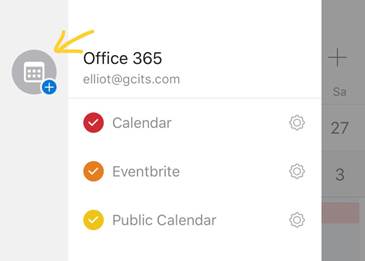
  • Tap the add calendar button.

Open a shared calendar in Outlook for iOS - GCIT


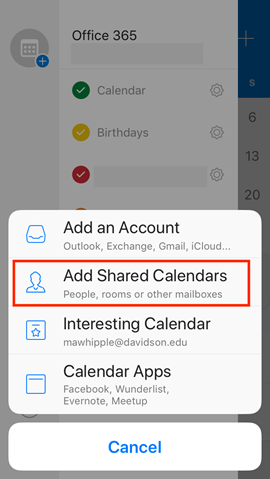
  • Tap Add Shared Calendars.


Add a shared calendar in Outlook for iOS and Android – Davidson Technology  & Innovation


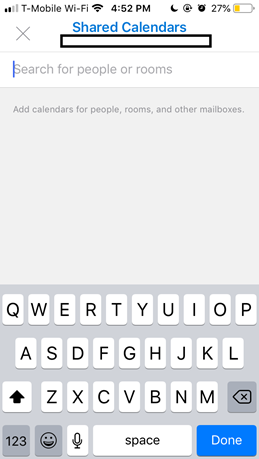
  • Search for the person or group


A screenshot of a phone

Description automatically generated


  • Tap the add button next to their name.
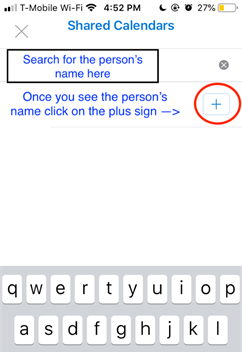
 

A screenshot of a phone

Description automatically generated


  • The calendar will appear in your list.
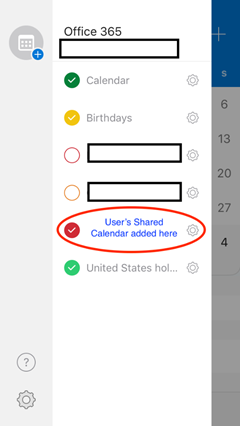
 

A screenshot of a calendar

Description automatically generated


How to add a Shared mailbox


Open Outlook Mobile

Swipe right to open the menu > Click the + Add icon
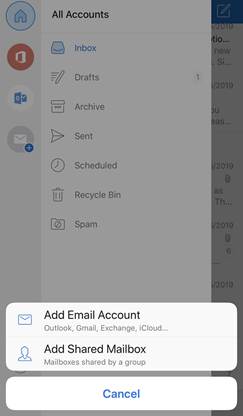

Using Outlook Mobile Shared Mailboxes


Select Add Shared Mailbox > enter the email address
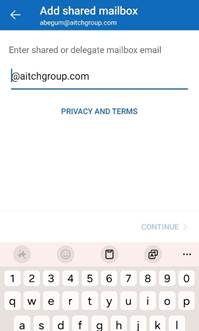

A screenshot of a phone

AI-generated content may be incorrect.


The mailbox should then appear in your list of mailboxes


Was this article helpful?

That’s Great!

Thank you for your feedback

Sorry! We couldn't be helpful

Thank you for your feedback

Let us know how can we improve this article!

Select at least one of the reasons
CAPTCHA verification is required.

Feedback sent

We appreciate your effort and will try to fix the article